
In short
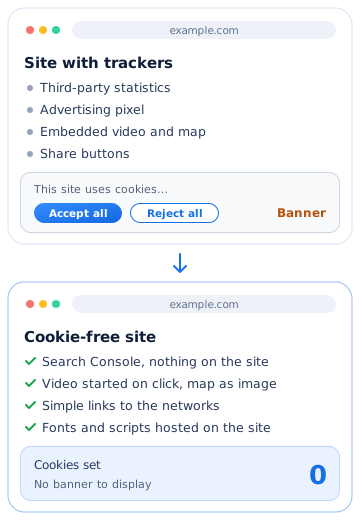
A cookie-free site sets no tracker subject to consent on the visitor’s device: it therefore has no banner to display. You get there by doing without third-party services that set them (statistics, advertising, embedded videos and maps, share buttons) or by replacing them with solutions that do not. The CNIL also exempts some audience measurement tools, under strict conditions.
What is a cookie-free site?
A cookie is a small file that a site stores in the visitor’s browser, then reads again on later pages or later visits. French rules do not only target cookies: they apply to all trackers, that is, any process that writes or reads information on the visitor’s device, such as a pixel, an identifier stored in the browser or a device fingerprint.
In practice, we speak of a cookie-free site for a site that sets no tracker subject to consent. It may use others, strictly necessary for a requested service, such as a shop’s basket: those do not require a banner.
The CNIL rules for a site with cookies, in six points
These rules come from article 82 of the French Data Protection Act, as the CNIL explains on its page how to make my website compliant. As soon as a site sets non-exempt trackers:
- consent is collected before any tracker is set or read;
- a clear positive action is needed: continuing to browse is not agreement, and closing the banner must be understood as a refusal;
- refusing must be as simple as accepting, for example with two buttons of the same format at the first level;
- the visitor is informed of the purposes and of the companies setting the trackers, before choosing;
- the choice is kept: the CNIL considers that a period of six months is generally appropriate before asking again;
- the visitor can change their mind at any time, for example through a link in the footer.
A banner that respects all this requires a consent management tool, setup and follow-up. A cookie-free site avoids this work, and its visitors have no window to close before reading.
Trackers exempt from consent
According to the same CNIL page, some trackers are strictly necessary for the service requested by the visitor and do not need their agreement:
| Tracker | Consent needed? |
|---|---|
| Remembering the visitor’s cookie choice | No |
| Logging in to an account and its security | No |
| Shopping basket and billing | No |
| Interface personalisation expected by the visitor | No |
| Some audience measurements | No, under strict conditions |
| Advertising, targeting, social networks | Yes |
For exempt trackers, the law does not require informing the visitor, but the CNIL recommends it, for example in the privacy policy. The full list and frequently asked questions are on its page website, cookies and other trackers.
Where a site’s cookies come from, and how to do without them
On a small business site, trackers rarely come from the site itself. They arrive with services added over time, often through a plugin or a copied piece of code. Here are the most common ones, and what you can do instead to get a cookie-free site.
| Service added | Cookie-free replacement |
|---|---|
| Third-party statistics | Search Console for Google searches, and an exempt measurement tool if needed (see below) |
| Embedded video | An image and a button: the player loads only on click, after information, or a simple link to the video |
| Embedded map | A map image hosted on the site and a “Directions” button that opens the maps app |
| Share buttons | Simple links to your pages on the networks, with no script from the network |
| Fonts and scripts loaded elsewhere | System fonts or files hosted on your own site |
| Form from an external service | A prepared e-mail link, or a form whose service commits to setting no tracker |
The CNIL states in its FAQ that share buttons often let social networks set trackers, and that a video player must not set any tracker subject to consent before the visitor agrees. For other services, check case by case: any resource loaded from another server passes at least the visitor’s IP address to it.
Sites built with a theme and many plugins accumulate these services without anyone noticing. The guide WordPress or custom-coded site compares the two approaches.
Measuring your audience with a cookie-free site
Doing without a banner does not mean working blind. Two solutions, which can be combined.
Search Console, nothing installed on the site
Google’s Search Console shows the searches that display your site, the number of clicks and the pages that receive them. These figures come from the search engine itself: no tracking code is placed on your pages. For a local business, they are often the most useful figures.
An exempt audience measurement tool
The CNIL accepts that an audience measurement tool is used without consent if it meets all these conditions, detailed on its page solutions for audience measurement:
- it is used only to measure your site’s audience, for your account alone;
- it produces only anonymous statistics;
- it does not follow the person on other sites and does not cross-reference their data with other processing;
- the provider does not reuse the data for its own account, which requires a written commitment from it.
It also recommends limiting the lifetime of trackers, for example to thirteen months, and keeping the collected information for no more than twenty-five months. On its page on traffic measurement, it cites Google Analytics among the offers that do not benefit from the exemption: with this tool, the banner remains necessary.
Real example: orbitoile.fr, 0 cookies
The Orbitoile site you are reading sets no cookies on its presentation pages and guides, and uses no audience measurement tool. The counter below reads the cookies present in your browser for this site, at the moment you read this page:
Live measurement
Cookies set by orbitoile.fr in your browser: 0.
Here is how the site achieves this:
- the fonts are those of your device, and no script comes from another server;
- quote requests go through a prepared e-mail, with no external form;
- social networks are simple links;
- the site tester queries Google’s PageSpeed Insights only if you run a test, with the address you enter;
- tracking is done in Search Console.
The site’s legal notices say so in one sentence, in a “Cookies and measurement” section. They also specify that the host records connections for security: these logs stay on the server and write nothing to your device.
Check whether your site is a cookie-free site, in two minutes
- Open your site in a private browsing window, on a computer, without clicking on the banner if there is one.
- Press F12 to open the developer tools, then open the “Application” tab in Chrome or Edge, “Storage” in Firefox.
- In the “Cookies” section, look at the list for your address: each line is a cookie, with the domain that set it.
- Browse two or three pages, start a video if there is one, then look again.
Cookies appear before any click on “Accept”? These are trackers set before consent, unless they are exempt. Note the domains that keep coming up: they point to the service to replace. To go further on speed and page weight, test your site live.
What a cookie-free site does not solve
- legal notices remain mandatory: the guide legal notices of a website gives the list;
- the data you receive, by e-mail, form or booking, remains personal data: you must inform people of its use, as the CNIL explains on its page informing people;
- without an advertising tracker, no retargeting of visitors on the networks: if online advertising is at the heart of your business, the banner will be hard to avoid on the pages concerned.
This guide is informative and does not replace legal advice. For a more complex site, an online shop or a site with online booking, payment and booking tools are also chosen according to the trackers they set.
Key takeaway
A cookie-free site sets no tracker subject to consent and has no banner to display. You get there by replacing third-party services that set them, tracking your visits in Search Console and, if needed, with an exempt measurement tool that meets the CNIL’s conditions.