
In short
A slow website is most often slow for reasons you can measure: too much code loaded on every page, images wider than the screen, scripts from third-party services. First test your site on mobile, note what exceeds Google’s thresholds, then fix in order: images, third-party scripts, plugins and page builder. A WordPress site can be fast: the Sentinelle Investigations site, built without a page builder, scored 99/100 on mobile on 24 October 2026.
Measuring a slow website before fixing it
Your site seems fast on your computer, with a good connection and a page already in memory. Your visitors often arrive on a phone. The mobile test of PageSpeed Insights reproduces this situation: according to Google’s page About PageSpeed Insights, it simulates a mid-range device on a mobile network.
You can run this test on the page test your website, which explains the results in plain words. Look mainly at three measurements, the ones Google highlights in its page on Core Web Vitals:
| Measurement | What it says about your site | “Good” threshold according to Google |
|---|---|---|
| Main content displayed | The time before the title or main image appears | 2.5 seconds or less |
| Responsiveness | The delay between a tap and the page’s reaction | Under 200 milliseconds |
| Stability | Whether content jumps while loading | Under 0.1 |
The grade out of 100 and how to read the whole report are covered in the guide PageSpeed score. Here, we look at what comes next: what makes the page slow, and what to do.
Why a website is slow: the most common causes
On a small business site, the same causes come back. The PageSpeed Insights report flags them in its diagnostics, page by page.
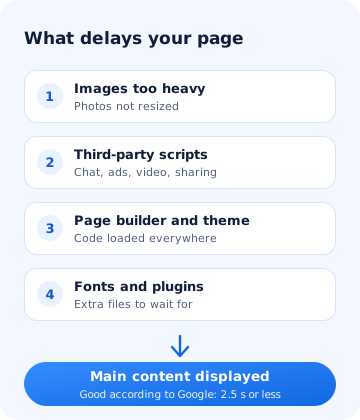
| Cause | What happens | The fix |
|---|---|---|
| Images too heavy | A camera photo of several megabytes sent as is to a phone | Resize, switch to WebP or AVIF, offer several sizes |
| Third-party scripts | Chat, advertising, embedded video, social media buttons: each downloads its own code | Keep the ones that really help, load the others only on click |
| Page builder | The layout code is loaded whether the page needs it or not | Lighten the settings, or rebuild key pages without it |
| Theme and plugins | Options and plugins installed one day and never removed | Take stock, remove what is no longer used |
| External fonts | The text waits for a font downloaded from another server | Host the fonts on the site, or use system fonts |
Lightening the images of a slow website
Google says so in its image best practices: images are often large, which can slow down page loading. The same page lists the formats Google reads, including WebP and AVIF, and the srcset attribute, which lets you offer several sizes of the same image.
In practice:
- an image should not be wider than the space it takes on screen;
- convert your photos to WebP or AVIF, two formats Google reads, and compare the file weight before and after;
- images further down the page can wait until the visitor gets close to them;
- the width and height stated in the code stop the text from jumping when the image arrives.
On an existing site, this is a simple fix to start with: it touches neither the content nor the layout.
Scripts from other services
Each service added to the site brings its code: a chat window, an advertising tool, a map, a video, share buttons. This code is downloaded from another server, and your page sometimes waits for it to finish before responding to a tap.
Many of these services also set trackers. The CNIL, the French data protection authority, points out that non-essential trackers, such as those for personalised advertising or social media share buttons, require the visitor’s agreement before being set. Hence a consent banner, which itself adds code.
For each script, ask the simple question: does this service bring me customers? If not, remove it. If it does but is rarely used, load it only when the visitor clicks. The guide cookie-free website shows that you can measure your audience without a banner.
The page builder and the theme
A page builder lets you assemble a site by drag and drop. The price of this comfort is general layout code, loaded so it can display anything, even what your page does not use. A theme sold with dozens of possible layouts follows the same logic.
This does not mean WordPress is slow. The criticism is about what gets piled on top. The guide WordPress or custom site compares the two approaches for a small business.
A fast WordPress: the Sentinelle Investigations example
The site of Sentinelle Investigations, a private detective agency in Lyon, which I built, runs on WordPress with a theme developed from scratch, without a page builder. Measurements of its home page on mobile with PageSpeed Insights, on 24 October 2026:
| Measurement on mobile | Result |
|---|---|
| Performance grade | 99/100 |
| Main content displayed | 1.1 s |
| Layout stability | 0.00 |
| Page weight | 279 KB |
The difference is not a trick: the theme was written for this site only, without a page builder or unused layouts. The figures can vary from one measurement to another.
In what order to fix a slow website
- Measure your home page and your two or three most visited pages, on mobile, three times each.
- The images: resize and convert the ones at the top of the page first.
- Third-party scripts: remove those no longer used, defer the others.
- Plugins and theme: deactivate what is no longer used, one item at a time, checking the site after each removal.
- Measure again, under the same conditions, before drawing conclusions.
Keep a backup before each step. A removed plugin can take with it a feature you were using without knowing it.
Fix or rebuild?
If the measurements remain far from the thresholds after these steps, the slowness may come from the very structure of the site: a page builder on every page, a theme that cannot be lightened. It is then better to rebuild than to patch. The page website redesign in Lyon explains how to rebuild a site without losing its search ranking.
Key points
A slow website is treated cause by cause: measure on mobile, lighten the images, remove useless scripts, then the excess in the theme and plugins. If the structure of the site is the problem, a redesign can take less time than a series of patches.